
Model Context Protocol.Now the way AI talks to procurement.
MCP stabilized in late 2024, Claude and other clients now support it natively, and procurement-specific servers - including Nvelop's - are live in production.
Course Overview
What you will learn.
Model Context Protocol (MCP) is an open standard, introduced by Anthropic in November 2024, that lets AI clients like Claude connect to external tools and data through a single well-defined interface. Instead of one custom API integration per system, an MCP server publishes a set of tools, resources, and prompts that any MCP-compatible client can discover and call. In procurement, that means Claude can query your spend cube, look up contract clauses, pull supplier risk, draft an RFx, or reconcile an invoice against a contract - through one governed channel, with audit trails, without exporting data to a third party.
What MCP is (and why it matters for procurement)
The Model Context Protocol is an open specification for how an AI assistant asks an external system for context or triggers an action. It was introduced by Anthropic in November 2024 and has since been adopted by every major Claude surface - Claude.ai Connectors, Claude Code, and the Anthropic API - as well as by third-party AI clients and IDEs. That adoption is the shift: procurement teams no longer have to build one bespoke integration per AI tool per system. They build one MCP server per system, and every AI client picks it up.
For a CPO, this collapses two problems into one. First, the "which AI vendor?" question stops locking you in - the same procurement MCP server serves Claude today and any other MCP client tomorrow. Second, the "how does AI see our data?" question stops being a data-export problem. MCP servers run in your network, expose only what you allow, and log every call.
One protocol, many clients
Claude.ai Connectors, Claude Code, the Anthropic API, and a growing set of third-party IDEs and agents all speak MCP. Publish once; reach every client.
Live context, not exports
AI reaches into your systems at query time. No CSV dumps, no vector databases mirroring your ERP, no data leaving your perimeter unless you decide it should.
Governance built in
Every MCP tool call is scoped, authenticated, and audit-logged. You decide which tools are read-only, which require approval, and who can invoke what.
Nov 2024
MCP spec released
stable transports since mid-2025
Native
In every Claude surface
Connectors, Code, and the API
Read-time
Not batch-time
AI asks your systems live
Portable
Any MCP client
no AI-vendor lock-in
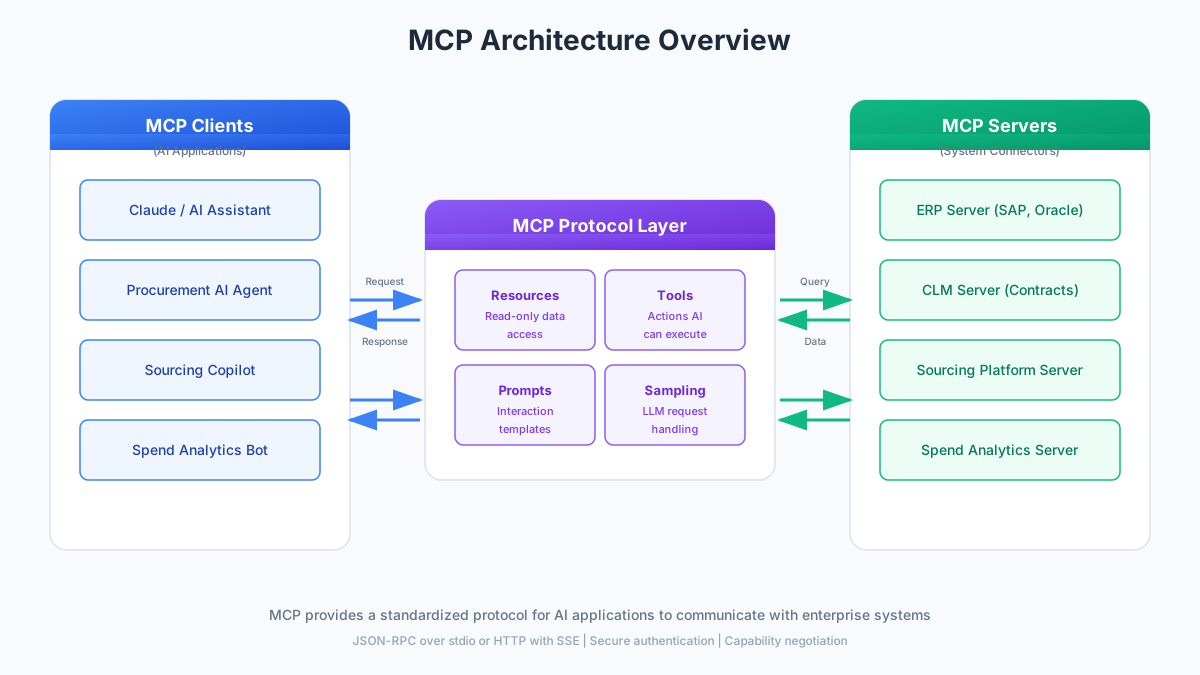
Figure 1: MCP Architecture Overview - Clients, Protocol Layer, and Servers.
Architecture - clients, servers, transports, primitives
MCP is a client-server protocol built on JSON-RPC. A client (the AI application) opens a connection to a server (the wrapper around your system), negotiates capabilities during initialization, and then exchanges JSON-RPC messages over one of three supported transports. The server exposes four kinds of building blocks - the "primitives" - and the client decides when to use each.
Transports available today:
stdio
The server runs as a local subprocess of the client. Simple, secure, and the default for desktop clients like Claude Code that want to talk to a locally installed procurement server.
HTTP + SSE
The original remote transport. HTTP for client-to-server messages, Server-Sent Events for streaming replies. Still supported for backward compatibility with older MCP clients.
Streamable HTTP
The recommended remote transport since 2025. Single HTTP endpoint, session-aware, supports both request/response and streaming. This is how Claude.ai Connectors reach hosted procurement MCP servers.
The four MCP primitives:
Tools
Functions the AI can call. Each has a JSON schema for inputs and outputs. Procurement examples: query_spend, get_contract, draft_rfx, match_invoice. Tools can be read-only or read-write.
Resources
Documents or datasets the client can pull into context. Procurement examples: a specific contract PDF, a supplier profile, a policy document, a cached spend report. Addressable by URI.
Prompts
Reusable prompt templates the server publishes to the client. Procurement examples: "evaluate this RFx response," "summarize this MSA in plain English," "check this PR against policy."
Sampling
The server can ask the client to run a model for it - so a procurement server can offload reasoning to Claude without shipping its own model. Optional and gated by client permission.
How a typical MCP interaction flows:
Initialize
Client opens a connection and sends an initialize request advertising which MCP version and capabilities it supports. The server replies with its own capabilities and protocol version.
Discover
Client calls tools/list, resources/list, and prompts/list to learn what the server offers. Each tool comes with a JSON schema so the model knows how to call it.
Model decides
Given the user question - say "what did we spend with Acme in FY24?" - Claude decides which tool to call and constructs arguments that match its schema.
Server executes
MCP server validates auth, translates the tool call into a SQL query, ERP lookup, or API call, and returns the result in JSON. Latency here is normal API-call latency.
Model responds
Client feeds the tool result back into context. Model either answers the user directly, or decides another tool call is needed and loops back to step 3.
Session ends
When the conversation closes, the client tears down the session. Any tool with side effects has already produced an audit-log entry on the server side.
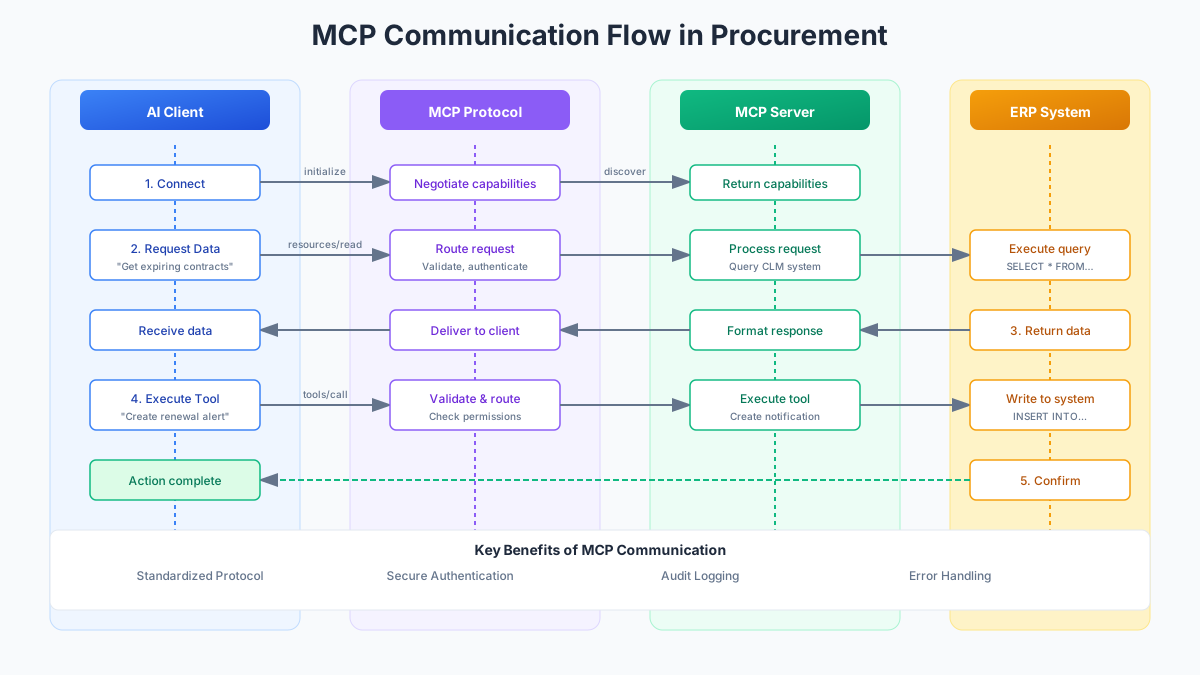
Figure 2: MCP Communication Flow - From Initialize to Response.
Use cases in procurement - six things that work right now
The list below is not aspirational. Every one of these is running in production procurement teams somewhere in mid-2026, against real ERPs, CLMs, and AP systems. What used to be a "build a bot" project is now "wire up an MCP server."
For a concrete reference, Nvelop's procurement MCP server exposes spend queries, contract lookup, supplier data, RFx drafting, and invoice matching - a superset of what you see below. You can install the read-only spend skill in a couple of clicks from the /features/analytics microsite, or talk to us about the full server for your stack.
Natural-language spend Q&A
"What did we spend with Acme Logistics in FY24, split by cost centre?"
- Joins ERP GL data, AP invoices, and PO data through one tool
- Returns numbers with sources, not vibes
- Handles multi-currency and fiscal calendar without a data warehouse
- Works across a Claude session, so follow-ups are one sentence
Contract clause lookup + red-flag detection
"Pull our MSA with Acme and flag anything unusual in the liability caps."
- Contract retrieval tool returns the specific clause and section
- Model compares against your standard playbook
- Flags deviations with rationale, not just yes/no
- Auditable - every clause referenced is linked back to the source doc
Supplier risk snapshot on demand
"Give me a risk snapshot for our top 10 suppliers in APAC."
- One tool aggregates financial, compliance, and delivery-performance signals
- Model composes a briefing across the whole set in one turn
- Fresh every time - no stale dashboards to schedule
- Drill-down is a follow-up question, not a new report request
RFx draft from requirements
"Draft a mid-market NetSuite implementation RFP from these bullets."
- Draft tool ingests raw requirements and a template selection
- Fills in scoring criteria, timelines, and boilerplate from your library
- Returns editable output the category manager owns end-to-end
- Cuts the "blank-page day" that eats most sourcing kick-offs
Invoice-to-contract reconciliation
"Does this AWS invoice line up with our EDP commit for Q3?"
- Matches invoice against the governing contract line items
- Detects overage, off-contract charges, and missing rebates
- Explains discrepancies rather than just flagging them
- Read-only by default; write action gated by human approval
Requisition assistance & policy Q&A
"Can I buy a $12k Airtable seat block on the existing MSA?"
- Combines catalog, contract, and policy tools in one answer
- Points users to preferred suppliers before they raise a PR
- Explains the policy, doesn't just cite it
- Reduces email tickets to your ops team by half or more
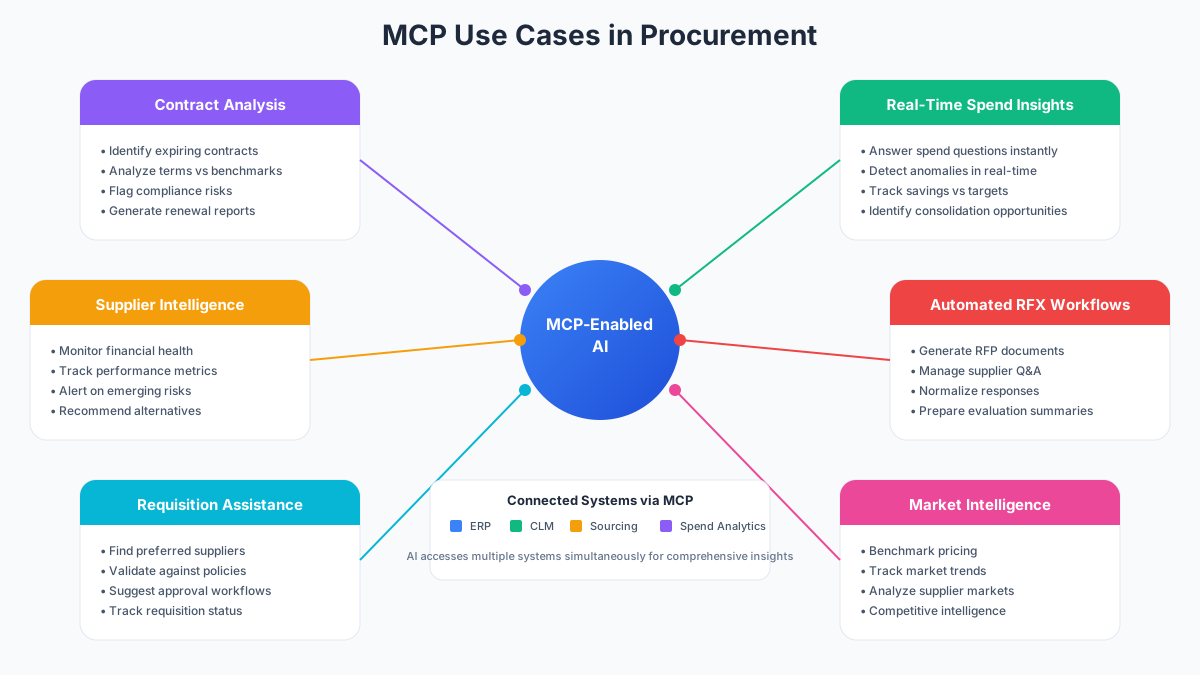
Figure 3: MCP Use Cases in Procurement - Six Production Applications.
Implementing MCP in your procurement stack
You do not need to build the full picture on day one. Most procurement teams that have shipped MCP successfully in the last twelve months started with one server against one system, proved value in a quarter, then expanded. The trick is picking the first server well - and using existing servers wherever they exist instead of building from scratch.
High-value data
Systems the AI needs constantly: spend cubes, contract repositories, supplier master. If Claude is going to answer procurement questions at all, it needs a hook into these first.
High-frequency workflows
Things people do every day: raising PRs, checking approvals, drafting RFx, reconciling invoices. High frequency means the time saved compounds fast.
Server already exists
For common systems (SAP, Coupa, Ironclad, Snowflake, and increasingly Nvelop) there is either a vendor-supplied MCP server or a well-maintained open-source one. Use it before writing yours.
Five-step deployment path:
Inventory your systems
Map your procurement estate: ERP, S2P suite, CLM, spend analytics, supplier data. Note who owns each system and who owns the data model - you will need both when you scope a server.
Pick one server to start
Almost always spend or contracts. They are read-only, they are high-value, and they let you demonstrate the value of MCP without touching a system of record. Nvelop's server covers both.
Deploy or install
For a vendor-provided server (Nvelop, SAP, Snowflake, and so on) install and point it at your instance. For custom systems, build a thin MCP server around your existing API - most teams get there in under two weeks.
Register with your Claude clients
For Claude Code and CLI clients, add the server to the client config. For Claude.ai, add it as a Connector in your workspace settings. Auth flows plug into your SSO.
Pilot, measure, expand
Run a two-week pilot with a small user group. Track questions asked, correctness of answers, time saved. Then add the second server. Repeat.
Start read-only. Add write actions with human approval.
The teams that regret their MCP rollout are the ones that gave AI write access to the ERP on day one. The teams that love their rollout gave AI read access to spend and contracts, watched what people asked for six weeks, then added guarded write tools (create-PR, send-RFx) behind explicit approval steps.
Security & governance
MCP is not the wild-west compared to your old integrations - it is the opposite. A well-designed MCP server is stricter than the shadow ChatGPT usage it replaces, stricter than the personal API keys engineers copy into config files, and stricter than most low-code integration platforms.
The security model rests on four ideas: scoped tools, per-tool authentication, in-network deployment, and comprehensive audit trails. The contrast worth naming is API-key sprawl - the state most enterprises are in today, with dozens of team members holding personal or service tokens to procurement systems, none of which anyone can revoke cleanly. MCP replaces that with one governed channel.
Read vs write scopes
Every tool is declared read-only or read-write in its schema. Clients see the label. Admins can allow-list only read tools for a given user group, and require explicit approval on any write tool - down to the individual tool, not the whole server.
Per-tool authentication
MCP servers plug into your existing SSO / OAuth 2.1. Each tool call carries the user's identity, not a shared service account. If Priya asks about contracts she cannot normally see, the server refuses - Claude never gets the data in the first place.
In-network deployment
You run the MCP server in your VPC or on-prem alongside the systems it wraps. Claude reaches it over a private link or Streamable HTTP through your gateway. Your ERP data does not leave your perimeter to reach the model - only the answer does.
Audit trails by default
Every tool call is logged with user, tool, inputs, outputs, and timestamp. Feed this into your SIEM the same way you would ERP audit logs. When compliance asks "what did AI see and do?" you have a real answer.
Data classification
Tag procurement data by sensitivity - public, internal, confidential, restricted - and enforce those tags at the tool boundary. A red-flag detection tool can be scoped to only ever see contract clauses, never rates.
Action boundaries
For write tools, name explicitly what they can and cannot do. Not "update supplier" - specifically "update supplier bank details only when a signed change form is provided and the change is under $10k."
Kill switches
Every MCP server should have an admin toggle that disables it instantly. When something goes sideways - a hallucination, a probing user, a curious auditor - you disable one server, not every AI integration you own.
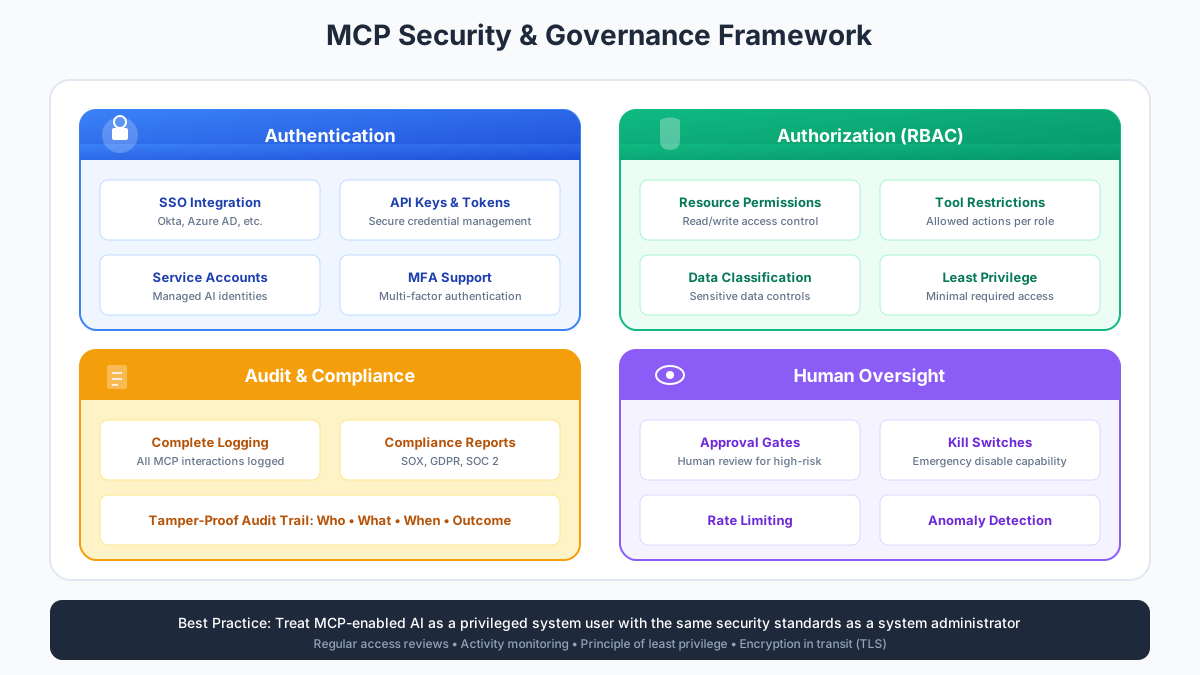
Figure 4: MCP Security Model - Scopes, Auth, In-Network Deployment, Audit.
Getting started & common pitfalls
The fastest way to understand MCP in procurement is to install one and ask it something. You do not need a project charter, an RFP, or a working group - the whole loop takes about ten minutes for a read-only server.
Three steps to your first MCP-powered procurement answer:
Pick an MCP server
Choose a procurement-specific server. For spend analytics on your own data, install Nvelop's spend MCP skill from the /features/analytics microsite - it is a self-contained Claude skill, no account required.
Register with your client
For Claude Code, drop the skill into your workspace. For Claude.ai, add the server as a Connector in your workspace settings. For a custom client, add the server URL to your MCP config file.
Ask your first question
Start with something read-only that touches real data: "show me our top 10 suppliers by spend last quarter," or "what does our contract with Acme say about auto-renewal." Watch which tools Claude picks.
Common pitfalls to avoid
- 1.Tool explosion. Once teams see how easy MCP tools are to write, they add 50+ of them. The model gets confused, picks the wrong one, and quality drops. Cap each server at 10-15 well-scoped tools; if you need more, split into multiple servers.
- 2.Unclear tool boundaries. Two tools called
get_supplierandlookup_vendorthat do slightly different things is a trap. Merge them, or make the difference explicit in the description. Every tool description is a mini-prompt the model reads on every call. - 3.Forgotten session lifecycles. Long-running procurement workflows (like an RFx that spans days) do not fit into one MCP session. Design tools to be stateless where you can, and give the client a way to resume from a session ID where you cannot.
- 4.Missing observability. Every tool call should produce a metric and a log line. If you cannot answer "how many times did anyone call
match_invoicelast week and what was the p95 latency," you cannot debug the server when a user complains. - 5.Write access without approval gates. The temptation to let AI "just create the PO" is real. Do not. Every write tool should require an explicit user confirmation in the client, and every server should log the confirmation alongside the action.
Where MCP goes from here
The direction of travel is clear: procurement suites are shipping MCP servers as a standard feature, not a premium add-on. Buying a system in 2026 without asking "what does your MCP server expose?" is the equivalent of buying a system in 2015 without asking about REST APIs. The teams that move first get to design their AI workflows around the systems they already own, rather than around whatever the next AI vendor bolts on top.
Test Your Knowledge
Complete this quiz to test your understanding of MCP in procurement concepts and applications.
Test your understanding of Model Context Protocol - the open standard that lets Claude and other AI clients securely connect to your procurement stack.
What problem does Model Context Protocol (MCP) solve for procurement AI deployments?
Try the Nvelop MCP skill in Claude - free.
Ask spend, contract, and supplier questions in plain language. No platform commitment, no account required.
Keep learning
Related Courses
AI in Procurement
How AI is being used across procurement in 2026, from spend analysis to contract review.
AI-Driven Procurement Automation
End-to-end AI workflows across sourcing, contracts, and P2P - what actually runs in production.
Claude for Procurement
A practical guide to using Claude in procurement teams: prompts, skills, and MCP servers.