
.png&w=3840&q=75)
Scale
Handle 100+ sourcing events per year across business units without breaking workflows.
- Multi-BU support
- Parallel event management
- Template standardization
Compare AI-native platforms, traditional suites, and point solutions. Deployment timelines, pricing, and ROI analysis for procurement leaders.
Updated for 2026 · Independent analysis · No vendor sponsorship
New to RFX tools as a category? Start with our RFX Tools Guide for the basics →
Market context
Enterprise procurement is not just about running RFPs. It is about managing hundreds of sourcing events across multiple business units, regions, and compliance frameworks, while maintaining consistency, speed, and audit readiness.
The market has moved beyond monolithic suites vs. point tools. A new category, AI-native platforms, is reshaping what is possible: deploying in weeks instead of months, automating document creation, and scoring proposals at scale.
The breakdown below carries the exact deployment timelines, pricing bands, and adoption data for enterprise buyers evaluating specific platforms; if you're earlier in the process and want a framework for which category fits your team's size and maturity rather than dollar figures, start with our RFX Software Comparison.
This guide helps you navigate all three categories, evaluate them against your needs, and make a decision backed by data rather than vendor marketing.
$12.6B
Procurement software market size (2026)
47%
Enterprises evaluating AI procurement tools
3x
Faster ROI with AI-native platforms
68%
Report implementation delays with legacy tools
Enterprise requirements
The right platform must handle enterprise complexity without requiring a 12-month implementation.
Handle 100+ sourcing events per year across business units without breaking workflows.
100% audit trails, SOC 2, GDPR, and industry-specific regulatory coverage.
Connect with ERP, CLM, SSO, and existing procurement infrastructure.
Cross-unit analytics, spend tracking, and vendor performance dashboards.
Market positioning
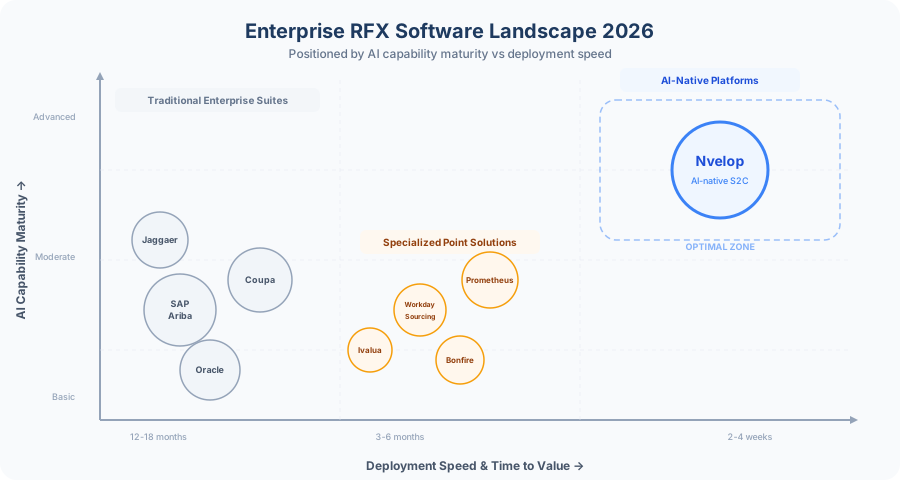
AI-native platforms occupy the optimal zone: highest AI capability with fastest deployment.
Platform landscape
Each has distinct strengths depending on your organization's priorities and timeline.
SAP Ariba, Coupa, Jaggaer
Full-stack suites covering everything from sourcing to payment. Deep ERP integration but lengthy implementations and significant customization costs. AI capabilities are typically add-ons.
Deep native ERP integration
Comprehensive P2P coverage
Established vendor ecosystems
Proven at Fortune 500 scale
12-18 month deployment
$100K–300K+ annual cost
Limited AI (add-on modules)
RFX-focused or sourcing-only tools
Purpose-built for sourcing and RFX management. Faster to deploy than suites with deeper sourcing-specific features. Integration with broader procurement infrastructure requires custom work.
Faster deployment (3-6 months)
Lower cost ($30K–100K/year)
Deep RFX-specific workflows
Focused UX for sourcing teams
Integration complexity with ERP/CLM
Limited scope (no P2P)
Moderate AI (rule-based only)
Nvelop and modern AI-first tools
Built from the ground up with AI at the core, not bolted on. Generative AI creates documents, scores proposals, and matches vendors. Deploys in weeks with pre-built integrations.
2-4 week deployment
40% faster sourcing cycles from day one
Generative AI (auto-create, auto-score)
Pre-built ERP, CLM, SSO connectors
Newer in market (track records building)
Head-to-head
Across the criteria that matter most for enterprise procurement teams.
| Criteria | Traditional Suites | Point Solutions | AI-Native (Nvelop) |
|---|---|---|---|
| Deployment Time | 12-18 months | 3-6 months | 2-4 weeks |
| Annual Cost | $100K-300K+ | $30K-100K | Competitive |
| AI Capabilities | Basic / add-on | Moderate (rule-based) | Native generative AI |
| Document Generation | Template-based | Template-based | AI auto-generation |
| Proposal Scoring | Manual | Semi-automated | Fully automated |
| ERP Integration | Deep (native) | API-based | Pre-built connectors |
| User Adoption | 6-12 months | 3-6 months | 1-2 months |
| Cycle Time Reduction | 15-25% | 25-35% | 40-50% |
| Compliance Coverage | Comprehensive | Moderate | 100% audit trail |
| Vendor Pool Expansion | Manual sourcing | Database search | AI-matched recommendations |
The architecture advantage
The fundamental advantage is not features. It is the architecture.
AI-native platforms deploy in weeks because they are built API-first with pre-integrated connectors, not customized from scratch.
Generative AI is not a premium add-on. It is embedded in every workflow, from document creation to proposal scoring to vendor matching.
Every action is logged, timestamped, and auditable. Compliance is not a configuration. It is the default state.
Teams see cycle time reductions within 30 days of deployment, not after a 12-month implementation.
Pre-built connectors for SAP, Oracle, Workday, and major CLM tools eliminate the systems integrator dependency.
AI handles the work that previously required additional procurement staff: proposal analysis, Q&A, and vendor shortlisting.
Download our weighted scoring framework and vendor comparison matrix, structured for enterprise procurement teams.
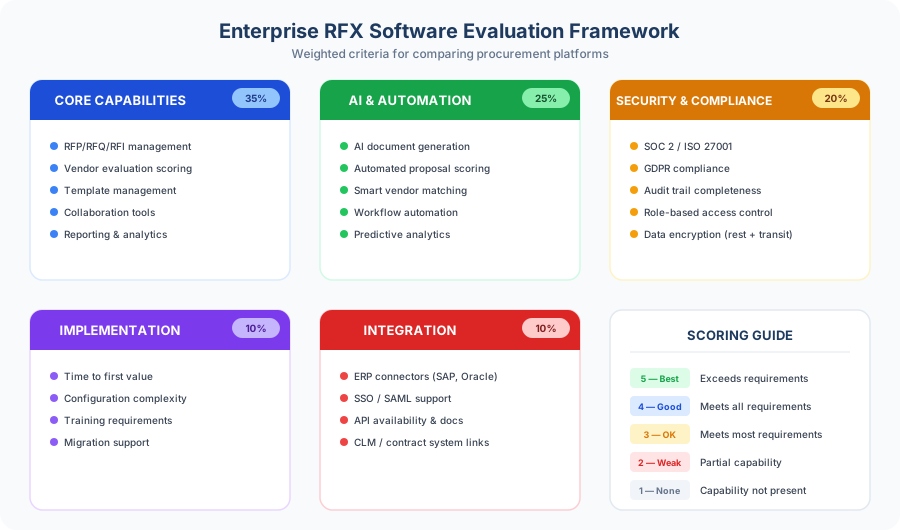
Evaluation criteria
Score each platform against your specific requirements. Adjust weights based on your organization's priorities.
Your roadmap
A structured approach from requirements through to contract.
Map your current sourcing workflow, identify pain points, and define must-have vs nice-to-have capabilities. Involve stakeholders from procurement, IT, compliance, and finance. Weight evaluation criteria based on your specific needs.
Evaluate vendors across all three categories. Use the comparison framework above to score each platform. Request customer references in your industry. Shortlist 3-4 vendors for deep evaluation.
Insist on demonstrations using your actual sourcing scenarios, not canned demos. Ask vendors to demonstrate AI capabilities with your data format and document types.
The most critical step. Run a real sourcing event on the platform with your team. Measure actual time savings, user adoption friction, and integration complexity. This is where vendor claims meet reality.
Use your POC results to negotiate terms. Ask about implementation support, training included, SLA guarantees, data migration assistance, and exit clauses. Compare total cost of ownership over 3 years, not just annual license fees.
Decision guide
Always run a hands-on proof of concept with your actual sourcing data before making a decision. Canned demos don't reveal workflow gaps, integration issues, or adoption friction. Ask vendors to demonstrate a complete RFP workflow end-to-end using your document formats and team structure. The best platform is the one your team actually uses.
FAQ
Common questions about enterprise RFX software selection.
Next steps
For procurement leaders
See how Nvelop deploys in weeks, reduces sourcing cycles by 40%, and scales across your entire organization without a long implementation.
Book a DemoCalculate your ROI
Estimate time savings, cost reduction, and sourcing cycle improvements based on your current procurement volume and team size.
Calculate Your ROIKeep reading