

Best RFP Software for Procurement
What to look for in RFP software, features, AI capabilities, scalability for large teams, and how to evaluate the right platform for your organization.
The Answer
What makes the best RFP software?
Large teams need more than document creation, they need the whole lifecycle covered without bottlenecks.
The best RFP software for procurement combines AI-powered document generation, centralized vendor management, collaborative evaluation, and compliance automation in one platform. For large teams, it must also deliver role-based access, cross-departmental workflows, and enterprise-grade scalability, so dozens of stakeholders can run multiple sourcing events simultaneously without bottlenecks.
Platform Comparison
Top RFP software platforms compared (2026).
A side-by-side look at the leading RFP platforms across the capabilities that matter most to enterprise procurement teams.
| Platform | Type | AI Gen | Scoring | Audit | Best for |
|---|---|---|---|---|---|
| NvelopOur Pick | AI-native | ✓ | ✓ | ✓ | End-to-end AI procurement |
| SAP Ariba | Legacy enterprise | △ | △ | ✓ | SAP ERP ecosystems |
| Coupa | Spend mgmt suite | △ | △ | ✓ | Spend analytics + RFPs |
| Jaggaer | Procurement suite | △ | △ | ✓ | Manufacturing / direct materials |
| Bonfire | Standalone RFP | ✗ | ✗ | △ | Public sector / government |
| Ivalua | Procurement platform | △ | △ | ✓ | Complex enterprise CLM |
✓ Full support △ Partial / AI-assisted ✗ Not available. Based on publicly available feature documentation. Last reviewed: June 2026. This comparison is produced and maintained by Nvelop; we've made every effort to represent competitors fairly, but features and pricing change, so confirm current details directly with each vendor.
Our verdict for enterprise teams
For teams that want to eliminate manual RFP creation and scoring, Nvelop is the only AI-native option in the table - it generates documents, scores proposals, and produces the audit trail automatically. SAP Ariba and Coupa are stronger if you are already embedded in those ecosystems and need spend analytics alongside RFP management. Bonfire remains a solid choice for public sector teams where simplicity and transparency outweigh AI automation.
Worked Example
Weighting RFP software by buyer profile.
The same six platforms score very differently depending on who is buying. Below is a weighted-scoring rubric applied to two common procurement contexts.
Large enterprise (50+ procurement users)
Weights: AI generation 30% · Audit/governance 30% · Integrations 20% · Scoring/evaluation 15% · Implementation speed 5%
| Platform | Weighted score |
|---|---|
| Nvelop★ | 9.1 |
| Ivalua | 7.8 |
| SAP Ariba | 7.6 |
| Coupa | 7.4 |
| Jaggaer | 7.2 |
| Bonfire | 5.4 |
When AI generation and audit governance are weighted heavily, Nvelop and Ivalua lead. The legacy suites (SAP Ariba, Coupa, Jaggaer) cluster in the mid-7s - competent across the board but not differentiated on AI.
Mid-market (5–20 procurement users)
Weights: Implementation speed 30% · AI generation 25% · Total cost 20% · Scoring/evaluation 15% · Audit/governance 10%
| Platform | Weighted score |
|---|---|
| Nvelop★ | 8.7 |
| Bonfire | 7.0 |
| Coupa | 6.5 |
| Jaggaer | 6.1 |
| SAP Ariba | 5.8 |
| Ivalua | 5.6 |
With implementation speed and cost weighted heavily, the legacy suites drop out - they require 6–12 month rollouts and dedicated procurement-ops headcount. Nvelop and Bonfire ship in weeks; the gap is AI capability and breadth.
Scores are illustrative, based on the comparison matrix above plus typical mid-market vs enterprise weighting patterns. Run your own scoring against your specific criteria using our RFP Scoring Template.
Nvelop for RFPs
See Nvelop generate, score, and close an RFP.
Generate RFP documents from requirements, automate vendor Q&A, and score proposals the moment they arrive - all in one audit-ready platform.
Lesson 1
What to look for in RFP software.
With dozens of RFP tools on the market, the key is understanding which capabilities actually matter for procurement teams. The best RFP software for procurement goes beyond document creation, it manages the entire lifecycle from requirements through vendor award.
Document Generation
AI-powered RFP creation from requirements, not just templates, but intelligent document assembly.
Vendor Management
Centralized portal for vendor communications, response collection, and Q&A management.
Evaluation & Scoring
Collaborative scoring with AI assistance, price normalization, and weighted criteria management.
Lesson 2
Essential features for large procurement teams.
The best RFP software for large teams addresses challenges that smaller tools can't handle: multiple concurrent events, cross-departmental collaboration, and enterprise-scale governance. Here's what distinguishes enterprise-grade from lightweight tools.
Role-Based Access
Different permissions for requestors, procurement leads, evaluators, approvers, and observers. Chinese wall controls for sensitive categories.
Large team need: 50+ users with different access levels across departments.
Cross-Department Workflows
Route RFPs through multiple departments for input and approval. Support parallel evaluation tracks with stakeholder-specific criteria.
Large team need: Finance, legal, IT, and business stakeholders all contribute.
Portfolio Dashboards
Leadership visibility across all active RFPs, status, timelines, spend under management, and compliance health at a glance.
Large team need: Managing 20+ concurrent sourcing events.
Template Libraries
Centralized, version-controlled template libraries for RFPs, evaluation criteria, and scoring rubrics, so every team follows the same standard.
Large team need: Consistency across 10+ category teams.
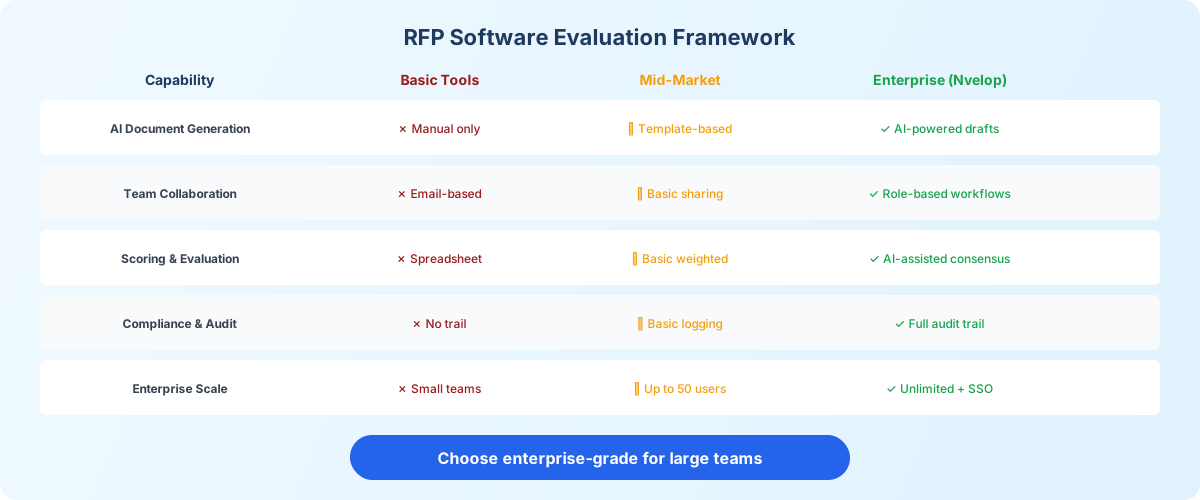
Figure 1: How basic, mid-market, and enterprise RFP platforms compare across key capabilities.
Lesson 3
AI capabilities in modern RFP platforms.
AI is the biggest differentiator in modern RFP software. The best platforms don't just store and route documents, they generate, analyze, and score them intelligently.
AI Document Generation
Generates complete RFP sections from requirements documents. AI drafts scope descriptions, evaluation criteria, pricing structures, and compliance requirements, reducing RFP creation from days to hours.
Automated Proposal Scoring
AI analyzes vendor proposals against RFP criteria, assigns preliminary scores with justification, normalizes pricing across different response formats, and flags gaps or non-compliant responses.
Intelligent Recommendations
Suggests evaluation criteria based on category best practices, recommends vendors from past events, identifies risks in vendor responses, and generates executive summaries from evaluation data.
AI as assistant, not replacement
The best RFP software uses AI to accelerate and inform human decision-making, not replace it. AI generates first drafts and preliminary scores, but procurement professionals review, adjust, and make final decisions. This approach combines speed with accountability.
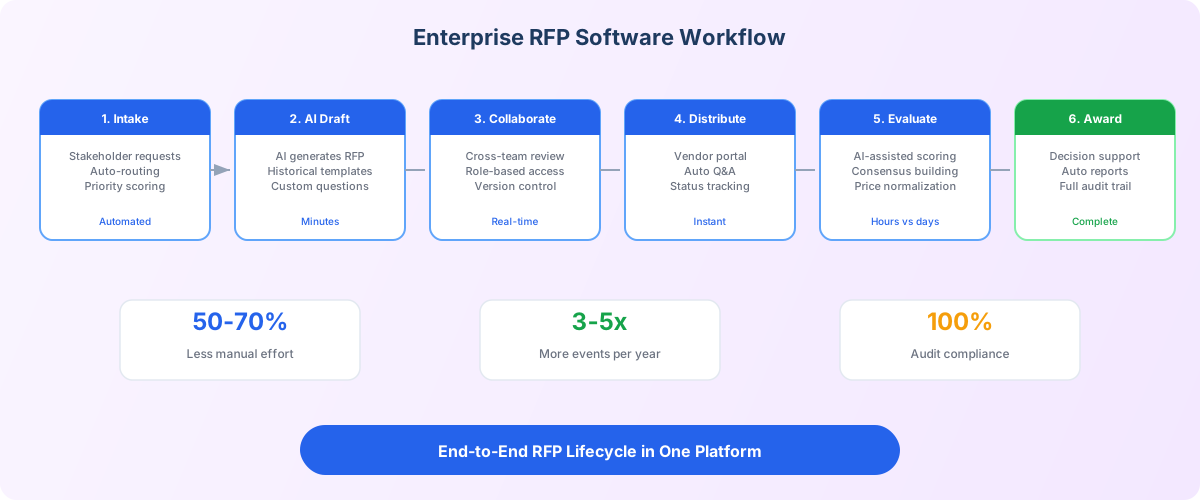
Figure 2: The end-to-end RFP lifecycle in enterprise software, from intake to award.
Lesson 4
Compliance and audit trail requirements.
For procurement teams, compliance isn't optional, it's a core requirement. The best RFP software builds audit readiness into every step rather than treating it as an afterthought.
Complete Audit Trail
Every action logged, document edits, vendor communications, score entries, approval decisions. Immutable records with timestamps and user attribution.
Policy Enforcement
Configurable rules that enforce organizational procurement policies: minimum vendor counts, approval hierarchies, mandatory documentation, and evaluation standards.
Approval Workflows
Multi-level approval routing based on contract value, category risk, or organizational hierarchy. Automatic escalation for overdue approvals.
Compliance Reporting
One-click audit packages, compliance dashboards, exception reports, and trend analysis. Export data in standard formats for external auditors.
Lesson 5
How to evaluate and compare RFP software.
Use this framework to evaluate RFP software vendors systematically. Score each platform across five dimensions to find the best fit for your team.
1
AI Capabilities
Generation, scoring, insights
2
Collaboration
Workflows, portal, teams
3
Compliance
Audit trail, enforcement
4
Integrations
ERP, CLM, e-procurement
5
Scalability
Users, events, data
Proof of concept is essential
Never select RFP software based on demos alone. Request a proof of concept using your actual procurement data and workflows. Test with real users in your organization. This reveals usability issues, integration challenges, and performance characteristics that demos hide.
Lesson 6
Implementation checklist for enterprise teams.
1. Map your current RFP process end-to-end
Document every step from requirement intake through vendor award. Identify bottlenecks, manual handoffs, and compliance gaps that the new software should address.
2. Define your template library
Standardize RFP templates, evaluation criteria, and scoring rubrics before implementation. The software enforces consistency, but you need to define what consistency looks like.
3. Configure roles and permissions
Map your organizational structure to system roles. Define who can create, edit, approve, and view RFPs at each stage. Test with real users before going live.
4. Set up integrations
Connect with your ERP, contract management, and vendor management systems. Test data flow in both directions before production rollout.
5. Pilot, measure, expand
Start with one category team and 3-5 RFP events. Measure cycle time, user adoption, and compliance scores. Iterate on configuration, then expand organization-wide.
Common implementation mistakes
- • Selecting software before mapping your current process and requirements
- • Skipping the pilot phase and rolling out to the entire organization at once
- • Not investing in user training, even great software fails without adoption
- • Ignoring integration requirements until after vendor selection
FAQ
Frequently asked questions.
Common questions about choosing, evaluating, and implementing RFP software.
Keep learning
Related Courses
RFX Automation Course
Learn how to automate RFP, RFQ, and RFI processes with AI, from document generation to compliance.
RFX Management Features
Explore Nvelop's AI-powered RFX tools for document generation, vendor Q&A, and proposal scoring.
Enterprise RFX Software Guide
In-depth comparison of enterprise RFX solutions across deployment time, cost, and AI capabilities.
RFX Tools Comparison
Side-by-side comparison of leading RFX platforms across traditional, point-solution, and AI-native categories.
Free RFP Scoring Template
Run your own weighted vendor scoring using the same rubric structure as the worked example above.
Using Nvelop (Platform Walkthrough)
9-module walkthrough of the full sourcing lifecycle in Nvelop - see the platform from the inside before booking a demo.
Next steps
See AI-powered RFP software in action.
See it in practice
Nvelop automates the entire RFP lifecycle, from AI-powered document generation to collaborative evaluation and audit-ready compliance.
Book a DemoNot ready for a demo?
Use our free RFP checklist to map your requirements and evaluation criteria before you talk to any vendor.
Get the RFP Checklist