

Nvelop AcademyUsing Nvelop · Module 3 of 9
Build Your RFX Document in Nvelop
Step-by-step guide to building an RFX in Nvelop - questions, pricing, terms, requirements, and evaluation criteria in one document.
CoversAI RFX generationVendor questionsT&C uploadWeighted evaluation
Quick Answer
The RFX tab has 7 sub-sections covering everything vendors will receive: questions, pricing, terms, requirements, evaluation criteria, and attachments. Use the Generate RFX button to get AI-assisted content for each.
5 min read·Beginner·Module 3 of 9
Module 3 of 9 - Using Nvelop
The RFX tab and its 7 sub-sections
What this module covers
The RFX tab's sub-sections - RFP Overview, Questions to Vendors, Pricing, Terms and Conditions, Requirements, Evaluation Criteria, and Attachments.
Why this matters
A well-built RFX here is what makes the later Evaluation step meaningful - vague requirements or missing evaluation criteria upfront mean messier, harder-to-compare vendor responses later.
Step by step
Building each section of the RFX
Step 1 of 8
The 7 RFX sub-tabs
Go to RFX - 7 sub-tabs: RFP Overview, Questions to Vendors, Pricing, Terms and Conditions, Requirements, Evaluation Criteria, Attachments.
2
Step 2 of 8
RFP Overview
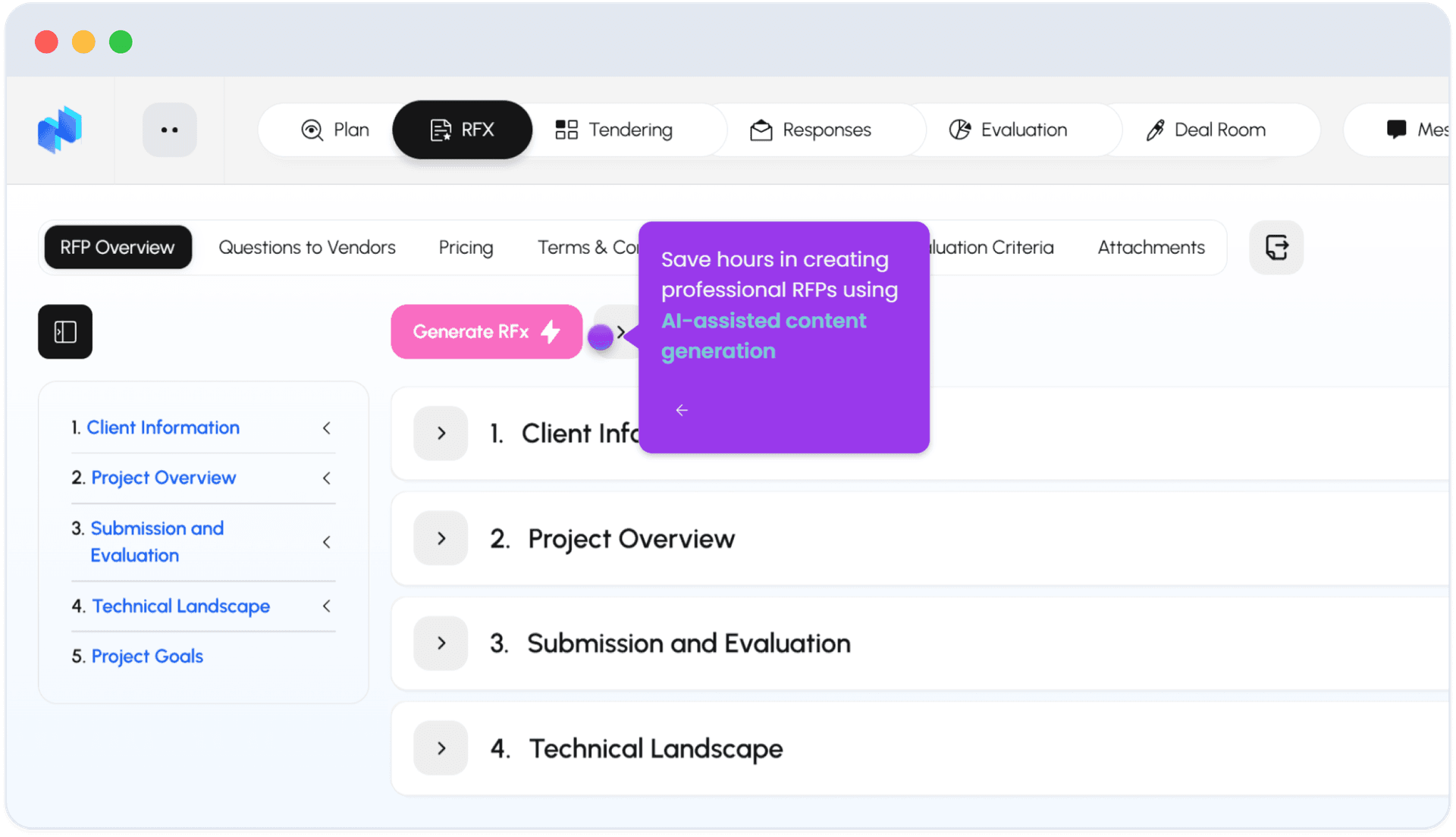
RFP Overview has a Generate RFX button for AI-assisted content generation, and a live-generated document preview (numbered sections like "1. Client Information," "1.1 Company Overview," building out the actual RFP text as you go).
3
Step 3 of 8
Questions to Vendors
Questions to Vendors are organized into 3 categories: Vendor Information, Solution Information, Implementation Plan.
4
Step 4 of 8
Pricing
Pricing has 2 sections: Rate Card and Pricing.
5
Step 5 of 8
Terms & Conditions
Terms and Conditions lets you upload your own documents (button: "Upload T&C") instead of starting blank - the screen shows "No T&C documents uploaded yet" until you do.
Step 6 of 8
Requirements
Requirements are split into Functional and Non-Functional tabs (example split: 6 functional / 12 non-functional), each with Process/ID, Description, Owner, and Status - filterable by Priority, Status, and Assignee, with a 'Set all to: Edited' bulk action.
.png&w=1920&q=75)
Step 7 of 8
Evaluation Criteria
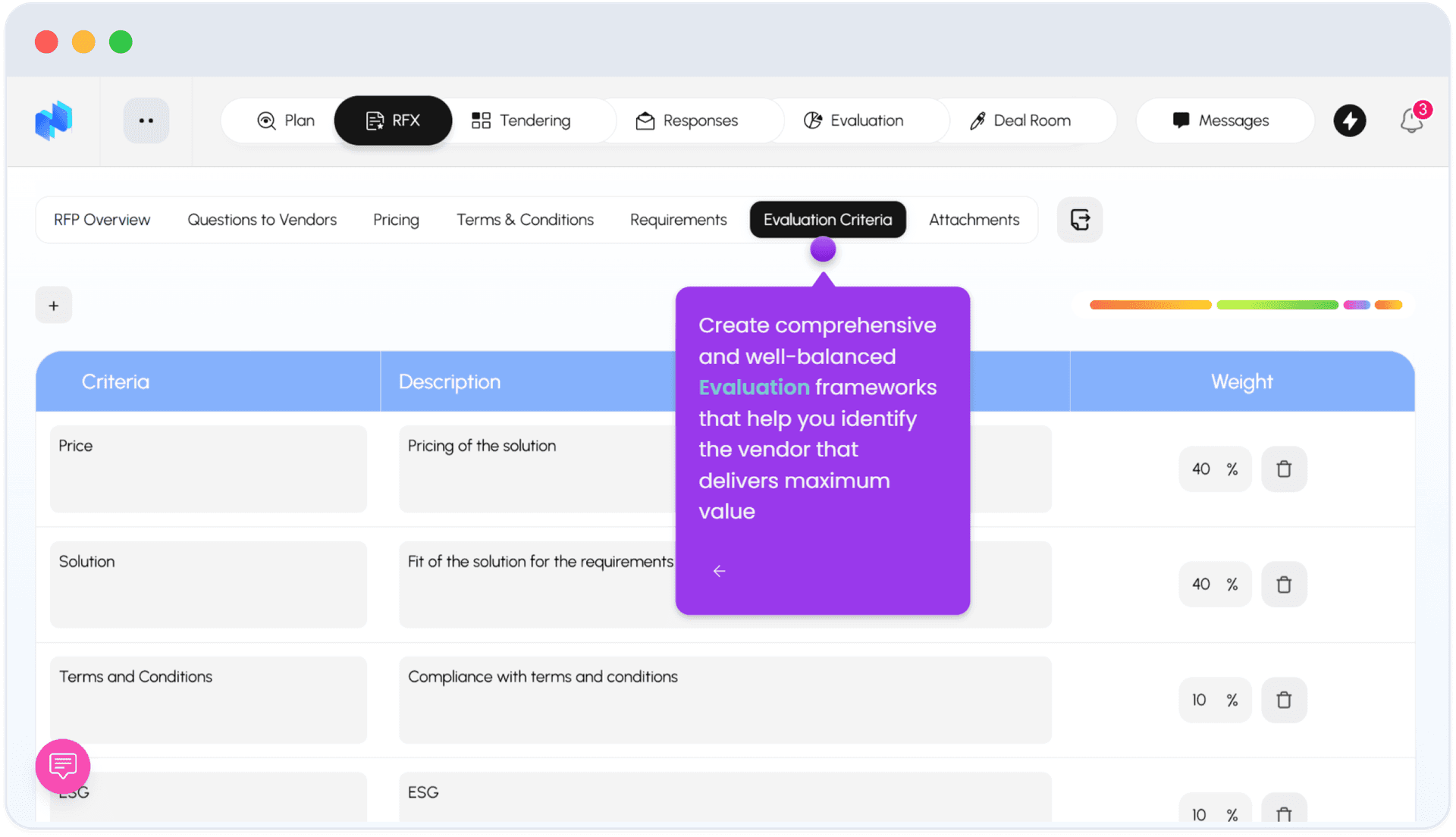
Evaluation Criteria is a weighted table - example weights: Price 40%, Solution 40%, Terms and Conditions 10%, ESG (partial weighting shown).
8
Step 8 of 8
Attachments
Attachments rounds out the RFX with any supporting files.
FAQ
Common questions
1Can AI help write the RFX?+
Yes - the Generate RFX button produces AI-assisted content you can then refine section by section before publishing.
2How are Evaluation Criteria weighted?+
As percentages across categories like Price, Solution, and Terms and Conditions - you set the split (e.g. 40/40/10 plus others summing to 100%).
3Are Requirements categorized?+
Yes - Functional vs. Non-Functional, each trackable by owner and status, with bulk actions to update status across multiple requirements at once.
Keep going
Continue in Using Nvelop
See Nvelop in action
Walk through the full sourcing lifecycle live with a product specialist.